
Charging Your EV
Steps
- Park
- Check your connector type and maximum charge power
- Plug in the connector until it clicks
- Pay
- Start your charge
Park
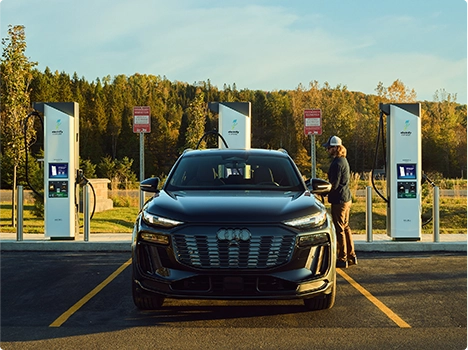
Park on the side where your vehicle’s charging port is located. Notice the connector type indicated on the parking spot.
Park close enough to the charger so the connector does not overextend when plugged in.
Check your connector type and maximum charge power
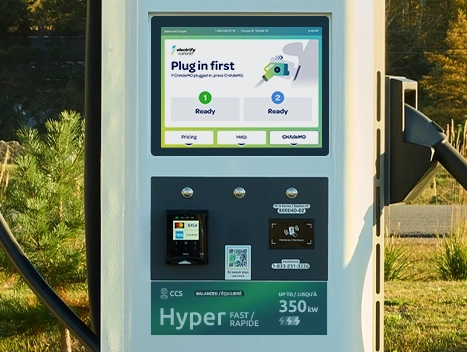
View the charger’s screen to ensure the connector is compatible with your vehicle’s charging port.
Our CCS connectors offer two charging speeds* Hyper-Fast (up to 350 kW) and Ultra-Fast (up to 150 kW).
For reference, your charging port should resemble the icon at the top of the charger’s labels.
Plug in the connector until it clicks
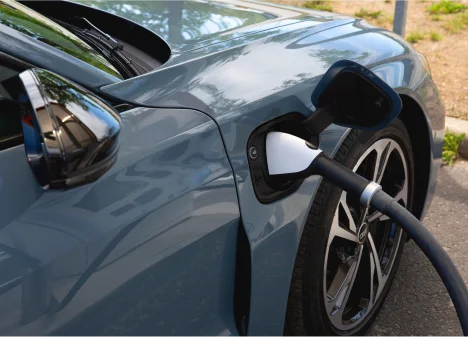
Remove the connector from the charger with two hands.
Firmly push the connector into your vehicle’s charging port until you hear a “click.”
The “click” means the connector is securely latched, and your vehicle is fully connected.
Listen for the ‘click’.
Pay
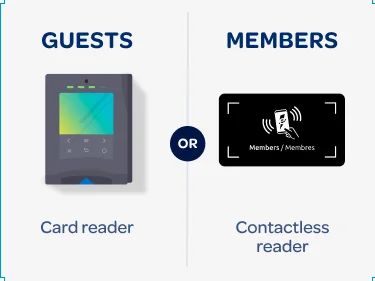
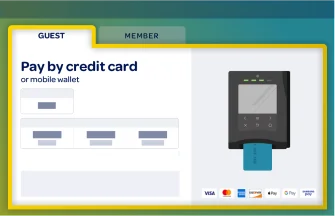
To pay as a guest...
Pricing will appear on the charger’s screen.
- Insert, tap, or swipe your credit card. Or use your mobile wallet* and tap your phone against the credit card reader.
- *Compatible with Apple, Google, and Samsung Pay.
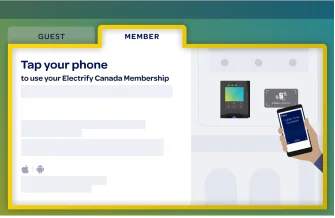
Charging costs will appear in the app.
Pass, Pass+, or Premium Offer members can pay for their charging session with the Electrify America app or select vehicle manufacturer apps.
- All charging sessions are billed directly to your debit or credit card on file.
- To ensure sufficient funds are available, temporary authorization hold in $20 increments will be placed on the card on file. You will only be charged for the actual cost of charging. Hold release times vary by bank.
Pass+ members save UP TO 20% on charging. download our app to become a member.


Start your charge
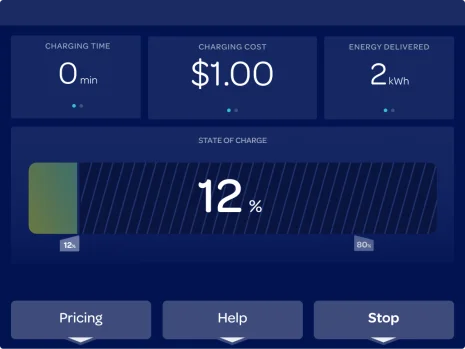
Session details will appear on the charger’s screen.
For updates about your session and to receive a text receipt:
- Download the Electrify Canada app
- Or enter your cell phone's number on the charger screen
- To manually end your charging session, press Stop.